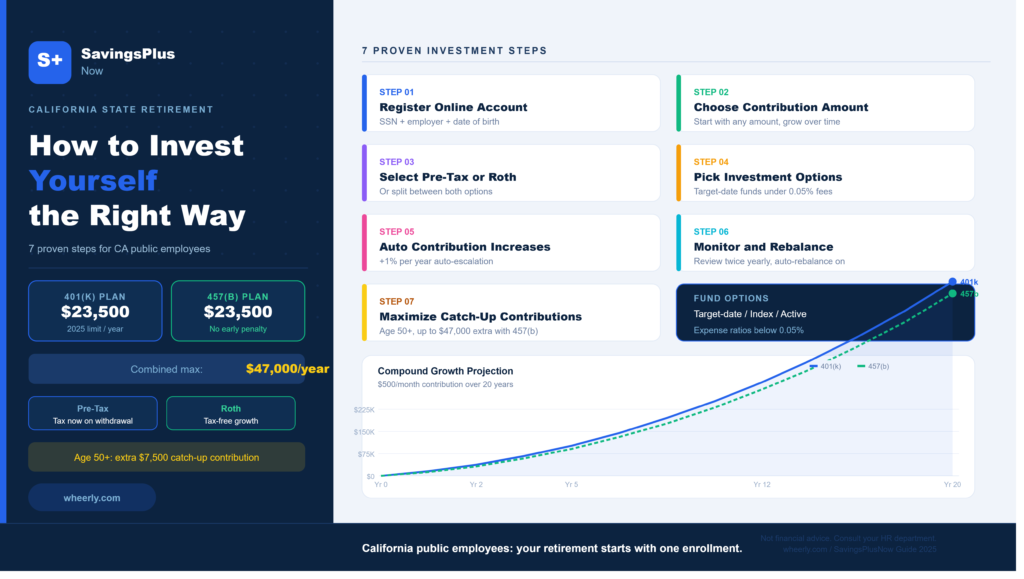
SavingsPlusNow is California’s official deferred compensation retirement program for state and public school employees. Millions of working professionals across the state have access to this powerful savings vehicle yet never take full advantage of it. The program lets you invest pre-tax or Roth after-tax dollars directly from your paycheck into a range of diversified investment options. Getting started is simpler than most people expect. Platforms like Wheerly help public employees and retail investors make smarter, data-driven decisions about long-term wealth building. This guide walks you through every step to invest in SavingsPlusNow correctly and confidently.
Table of Contents
- What Is SavingsPlusNow?
- Who Qualifies to Enroll?
- Step 1: Register Your Online Account
- Step 2: Choose Your Contribution Amount
- Step 3: Select Pre-Tax or Roth Contributions
- Step 4: Pick Your Investment Options
- Step 5: Set Up Automatic Contribution Increases
- Step 6: Monitor and Rebalance Your Portfolio
- Step 7: Maximize Catch-Up Contributions
- Common SavingsPlusNow Mistakes to Avoid
What Is SavingsPlusNow?
SavingsPlusNow is administered by the California Department of Human Resources. It offers two plan types: a 401(k) and a 457(b). Both allow state employees to reduce taxable income while building retirement wealth. The 457(b) plan is particularly valuable because it has no 10% early withdrawal penalty before age 59.5, unlike most other retirement accounts. Contributions grow tax-deferred until withdrawal in retirement. The program offers dozens of investment funds, including target-date funds, index funds, and actively managed options. It is one of the most accessible and tax-efficient retirement tools available to California public employees, yet many eligible workers never activate it.
Who Qualifies to Enroll?
Eligibility is broad. Any California state employee or public school employee who receives a paycheck from the state qualifies. Part-time employees are also eligible. You do not need a minimum tenure or waiting period to begin. Enrollment is entirely voluntary. The program is separate from CalPERS or CalSTRS pension benefits, meaning it supplements, not replaces, your defined benefit pension. If you work for a California state agency, a state university, or a public school district, you almost certainly qualify. Confirm your eligibility directly through your HR department or by visiting the SavingsPlusNow website and checking the employer participation list.
Step 1: Register Your Online Account
Visit the official SavingsPlusNow portal and click “Enroll Now.” You will need your Social Security number, your employer name, and your date of birth. The process takes about ten minutes. Once your account is created, you gain full access to your dashboard, investment options, and contribution settings. Set a strong password and enable two-factor authentication immediately. Your account is where all investment decisions happen. You manage your contributions, choose your funds, and track performance from a single login. Most new enrollees can complete the full setup, including investment selection, in under thirty minutes. There is no paperwork to mail.
Step 2: Choose Your Contribution Amount
The 2025 IRS contribution limit for both the 401(k) and 457(b) plans is $23,500 per year each. That means eligible employees can contribute up to $47,000 annually across both plans combined. Start with whatever amount fits your budget. Even $50 per paycheck makes a meaningful difference over a twenty-year career. According to the IRS retirement plan guidelines, consistent contributions combined with compound growth are the single most reliable path to retirement security. Avoid the mistake of waiting until you earn more to start. Time in the market beats timing the market every time. Set your contribution as a percentage of income rather than a fixed dollar amount so it scales naturally with raises.
Step 3: Select Pre-Tax or Roth Contributions
SavingsPlusNow offers both traditional pre-tax and Roth after-tax contribution options. Pre-tax contributions reduce your taxable income today and you pay taxes on withdrawals in retirement. Roth contributions use after-tax dollars now but grow completely tax-free, including all gains. The right choice depends on your current tax bracket and expected retirement income. If you expect to be in a higher tax bracket in retirement, Roth is usually smarter. If you want immediate tax relief on your paycheck, pre-tax is the better move. Many investors split contributions between both options to hedge against future tax changes. SavingsPlusNow allows this flexibility within a single account.
Step 4: Pick Your Investment Options
SavingsPlusNow offers a broad fund menu. Target-date retirement funds are the simplest choice for most employees. Pick the fund closest to your expected retirement year and it automatically adjusts its asset allocation over time. For investors comfortable managing their own portfolio, the program also offers individual index funds covering U.S. equities, international stocks, and fixed income. Expense ratios are low, typically below 0.05% for index options, which is competitive with the best retail brokerages. Avoid picking actively managed funds based on recent past performance. Consistent low-cost index exposure is the strategy that outperforms most active managers over decades.
Step 5: Set Up Automatic Contribution Increases
SavingsPlusNow includes an auto-escalation feature. This allows you to schedule automatic annual increases to your contribution rate, typically by 1% each year. Activate this feature immediately after enrollment. Most employees never feel the difference in their take-home pay because raises tend to offset the small increase. Over a ten-year period, auto-escalation can double your annual contribution without any manual action on your part. This one feature has a measurable, compounding impact on your final retirement balance. It is one of the most underused tools in the entire program and one of the most powerful.
Step 6: Monitor and Rebalance Your Portfolio
Log in to your SavingsPlusNow account at least twice per year. Review your asset allocation to ensure it still matches your risk tolerance and retirement timeline. Markets shift, and your portfolio can drift far from its original target mix without a rebalance. SavingsPlusNow offers an automatic rebalancing option that restores your chosen allocation on a quarterly or annual schedule. Enable it. Manual rebalancing works too, but automation removes the emotional component that causes most investors to sell low and buy high. Keep your investment strategy simple, consistent, and aligned with your retirement date.
Step 7: Maximize Catch-Up Contributions
Employees aged 50 and older can contribute an additional $7,500 per year under IRS catch-up rules. The 457(b) plan also offers a special pre-retirement catch-up provision for employees within three years of their normal retirement age. This provision allows contributions up to double the standard annual limit. Use it. The final decade before retirement is your highest-earning period and your best opportunity to accelerate your savings rate. SavingsPlusNow makes activating catch-up contributions simple through your online account settings. If you qualify, there is no reason to leave this tax-advantaged contribution room unused.
Common SavingsPlusNow Mistakes to Avoid
Never leave your contributions in the default money market fund. Many new enrollees are auto-enrolled into a conservative default option that grows slowly. Move your balance into an age-appropriate target-date fund or index portfolio immediately. Do not take early withdrawals unless it is a true financial emergency. Withdrawals from the 401(k) before 59.5 trigger taxes and a 10% penalty. Avoid changing your investment selections based on market news or short-term volatility. Stay the course. Review your beneficiary designations annually and update them after any major life event.

