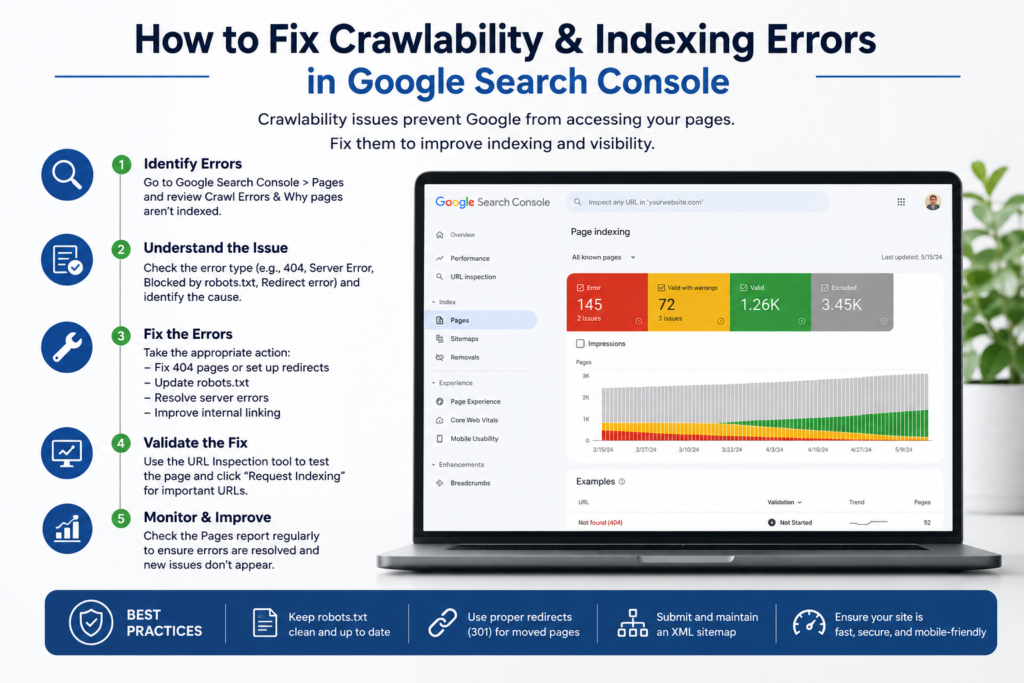
How to Fix Crawlability & Indexing Errors: Best GSC Guide
Many website owners focus heavily on content creation but overlook the technical factors that determine whether their content can actually appear in Google Search results. Before a page can rank, Google must first discover it, crawl it, and then add it to its index. If any of these steps fail, even the best-written content may remain invisible to potential visitors.
Crawlability refers to Google’s ability to access and navigate your website. Indexing, on the other hand, is the process of storing your pages in Google’s database so they can appear in search results. Understanding the relationship between these two processes is the first step toward fixing visibility problems, resolving persistent indexing issues, and improving organic traffic.
1. Technical Frameworks and Diagnostics
How Google Search Console Helps Identify Technical Issues
Google Search Console serves as a direct communication channel between your website and Google. It provides valuable reports that reveal why certain pages are not appearing in search results. The Page Indexing Report, URL Inspection Tool, and Crawl Statistics Report can quickly highlight errors that affect search visibility.
Website owners who want to improve their technical SEO often rely on resources such as advanced SEO optimization strategies to better understand search engine behavior. By regularly reviewing Search Console data, you can detect structural indexing issues early and prevent them from affecting your website’s organic growth.
Understanding the Most Common Indexing Errors
Several indexing problems appear repeatedly across websites of all sizes. Some pages may show the status “Discovered – Currently Not Indexed,” while others may be marked as “Crawled – Currently Not Indexed.” These warnings indicate that Google knows the page exists but has decided not to add it to the index yet.
Other common technical barriers include:
- Soft 404 code errors
- Unresolved duplicate pages
- Blocked script resources
- Broken redirect chains
- Accidental noindex tags or directives
Each error requires a different solution, making it essential to understand the root cause before attempting to handle your current indexing issues.
2. Structural Barriers and Directives
Fixing Pages Blocked by Robots.txt
The robots.txt file controls which sections of a website search engines can access. While it is useful for preventing crawlers from visiting unnecessary pages, accidental restrictions can stop important content from being discovered.
Review your robots.txt file carefully and look for directives that may be blocking critical pages, folders, images, or scripts. Even a small mistake can prevent Googlebot from accessing valuable content. After making corrections, test the affected URLs using Search Console and request a fresh crawl to ensure Google can access them properly.
Removing Unintended Noindex Directives
Many websites accidentally prevent indexing through noindex tags. These directives tell search engines to exclude specific pages from search results. While useful for private or duplicate content, they become problematic when applied to pages that should rank.
Check your page source code or SEO plugin settings to identify unnecessary noindex tags that trigger unwanted indexing issues. Once removed, submit the URL through Google Search Console’s URL Inspection Tool and request indexing. This simple action can often restore visibility for important pages that were unintentionally hidden from search engines.
3. Quality Optimization and Server Reliability
Resolving “Crawled – Currently Not Indexed” Issues
This status can be frustrating because it indicates that Google successfully visited the page but chose not to index it. In most cases, the issue is related to content quality, duplication, or lack of value compared to other indexed pages.
To resolve the problem and bypass these indexing issues, improve the page’s content depth, originality, and usefulness:
- Expand thin articles: Add data-driven facts and unique insights.
- Improve layout formatting: Use clean headings and bullet lists for readability.
- Incorporate media assets: Include relevant images, vectors, and infographics.
- Strengthen internal links: Connect the topic naturally to other relevant parts of your site.
Google is more likely to index pages that provide meaningful information and a positive user experience. Consistently publishing high-quality content also helps establish trust and authority over time.
Fixing Duplicate Content Problems
Duplicate content often confuses search engines because multiple URLs may contain nearly identical information. As a result, Google may struggle to determine which version deserves to be indexed and ranked.
Implement canonical tags to indicate the preferred version of a page. Ensure that internal links, XML sitemaps, and canonical URLs all point to the same preferred destination. Proper canonicalization helps consolidate ranking signals and prevents major indexing issues that can weaken your overall SEO performance.
Addressing Server and Connectivity Errors
Search engines expect websites to be accessible whenever they attempt to crawl them. If your server frequently returns 500-series errors, timeouts, or connection failures, Google may reduce crawl activity and delay indexing.
Monitor your hosting performance regularly and investigate any server-related warnings reported in Search Console. Upgrading hosting resources, optimizing database performance, and implementing caching solutions can significantly reduce your platform’s indexing issues. Reliable server performance ensures that Googlebot can consistently access and evaluate your content.
4. Crawl Efficiency and Architecture
Optimizing XML Sitemaps for Faster Discovery
An XML sitemap acts as a roadmap that helps search engines discover important pages more efficiently. However, many websites submit outdated sitemaps containing redirects, broken links, or non-indexable URLs.
Review your sitemap regularly and include only pages that should appear in search results. Remove error pages, redirects, and duplicate URLs. After updating the sitemap, resubmit it through Google Search Console and monitor the status to clean up potential indexing issues. A clean sitemap improves crawl efficiency and helps search engines prioritize valuable content.
Strengthening Internal Linking for Better Crawlability
Internal links help search engines understand the structure of your website and discover content more effectively. Pages with few or no internal links often receive less crawling attention and may remain unindexed for extended periods.
Create logical connections between related articles, categories, and important landing pages. Use descriptive anchor text that clearly explains the destination page. Strong internal linking distributes authority throughout the site while mitigating indexing issues and helping both users and search engines navigate your content more efficiently.
5. Console Tools and Long-Term Oversight
Using the URL Inspection Tool Effectively
The URL Inspection Tool is one of the most valuable features within Google Search Console. It allows you to see exactly how Google views a specific page, including its indexing status, crawl history, and any detected issues.
Whenever you fix a technical problem, use the tool to test the URL and request indexing. This process notifies Google that changes have been made and encourages a fresh review of the page to solve any lingering indexing issues. Although indexing is never guaranteed, this step often accelerates the process significantly.
Monitoring Crawl Statistics and Validation Reports
Fixing technical SEO issues is not a one-time task. Search engines continuously crawl websites, and new errors can appear as content grows. The Crawl Statistics Report provides insights into Google’s activity, helping you identify unusual changes in crawl behavior.
After resolving an issue, use the Validate Fix feature to confirm your corrections. Monitor validation progress and continue reviewing reports regularly. Consistent monitoring ensures that crawlability and indexing issues do not return and that your website remains healthy from a technical SEO perspective.
Frequently Asked Questions (FAQs)
1. Why are my pages not appearing in Google search results?
Pages may not appear because they have not been indexed, are blocked from crawling, contain duplicate content, or provide insufficient value compared to competing pages.
2. How long does Google take to index a page?
Indexing can take anywhere from a few hours to several weeks depending on website authority, crawl frequency, content quality, and technical factors.
3. What does “Discovered – Currently Not Indexed” mean?
It means Google knows the page exists but has not crawled or indexed it yet, often due to crawl budget limitations or content prioritization.
4. Can poor internal linking affect indexing?
Yes. Pages with weak internal linking structures are harder for search engines to discover and are more likely to experience various indexing issues.
5. How often should I check Google Search Console?
For active websites, reviewing Search Console at least once per week helps identify technical SEO issues before they impact traffic and rankings.
Conclusion
Crawlability and indexing errors can quietly prevent a website from reaching its full search potential. Even exceptional content cannot rank if Google cannot access or index it properly. By regularly monitoring Google Search Console, fixing robots.txt restrictions, removing unnecessary noindex tags, improving content quality, optimizing sitemaps, and strengthening internal linking, website owners can create a solid technical foundation to eliminate indexing issues for long-term SEO success. Consistent attention to these technical details ensures that valuable content remains discoverable, indexable, and capable of attracting sustainable organic traffic from search engines.

