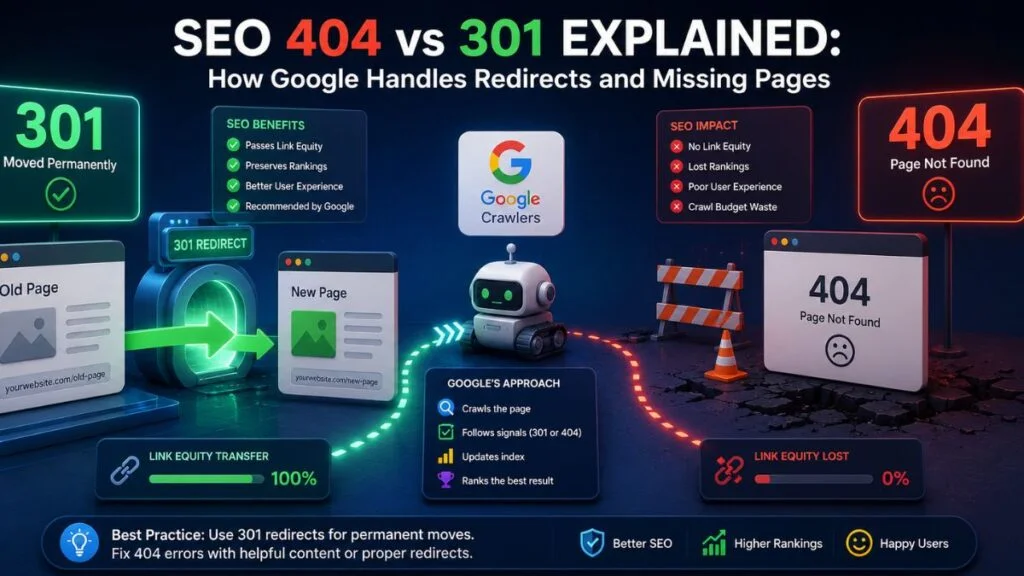
Understanding how Google actually processes a 301 or 404 — not just what the codes mean, but what happens inside Google’s crawling and indexing pipeline after it encounters one — separates surface-level SEO knowledge from genuine technical fluency. This article walks through Google’s handling of each scenario step by step, using Search Central documentation and observable crawler behavior, so you know exactly what to expect and when.
Step One: Googlebot Requests the URL
Every crawl begins the same way — Googlebot sends a request and reads the response header before doing anything else. The status code in that header determines the entire subsequent processing path.
GET /page-url/ HTTP/1.1
Host: example.com
The server’s reply — whether 200, 301, or 404 — branches Google’s behavior immediately. This is why status codes matter more than page content in the earliest stage of crawling: Google decides how to treat the URL before it ever renders or indexes anything on the page.
How Google Processes a 301
HTTP/1.1 301 Moved Permanently
Location: https://example.com/new-page/- Googlebot follows the redirect to the destination URL in the same crawl session, in most cases.
- The destination is queued for indexing (or re-indexing if already known) as the canonical version of that content.
- Signal consolidation begins — Google’s documentation describes 301s as a strong signal to merge duplicate or relocated content under one URL, with associated ranking signals migrating over subsequent crawl cycles rather than instantly.
- The old URL is gradually dropped from the index once Google confirms the redirect is stable and consistently returned, typically after repeated crawls over several weeks.
Google has also stated that it treats 301s and 302s similarly in modern crawling in terms of following the redirect, but only 301 reliably signals permanence for long-term signal consolidation — 302s should be reserved for genuinely temporary moves.

How Google Processes a 404
HTTP/1.1 404 Not Found
Content-Type: text/html- Googlebot logs the response and does not index the page content, even if content is technically present in the body of a “soft 404.”
- The URL is flagged in Search Console under the Page Indexing report as “Not Found (404).”
- Google reduces crawl frequency for that specific URL over time, since repeated 404s signal the resource is unlikely to return.
- The URL is eventually removed from the index entirely, usually within a few weeks, though previously high-authority URLs may be revisited periodically for longer before Google fully gives up.
A critical nuance: Google distinguishes between a “hard” 404 (proper HTTP status) and a “soft 404” — a page that returns 200 OK but displays “page not found” content to users. Soft 404s confuse Google’s classification and are explicitly flagged as a problem in Search Console because they waste crawl resources on pages Google can’t confidently categorize.

| Google’s Processing Stage | 301 Redirect | 404 Not Found |
|---|---|---|
| Immediate crawler action | Follows redirect to destination | Logs error, does not index content |
| Search Console classification | Redirect noted, destination indexed | “Not Found (404)” entry |
| Crawl frequency over time | Maintains or increases at destination | Decreases at the dead URL |
| Signal consolidation | Gradual transfer over weeks | No transfer, signals expire |
| Soft error risk | Low, if implemented as true HTTP 301 | High, if page returns 200 with “not found” content |
| Long-term index status | Old URL dropped, new URL indexed | URL removed from index |
Common Google Handling Mistakes to Watch For
- Returning a 200 status for a “page not found” message — this creates a soft 404, which Google explicitly calls out as a misconfiguration in Search Console.
- Using JavaScript-based redirects instead of server-side 301s — Google can process these, but it adds rendering overhead and delay compared to a direct HTTP redirect.
- Redirecting to a URL that itself returns a 404 — this creates a dead-end chain Google flags and refuses to fully consolidate.
- Using 302 (temporary) redirects for permanent moves — this can delay signal consolidation indefinitely since Google may keep the original URL indexed as canonical.
Step-by-Step: Verifying How Google Sees Your URL
- Open Google Search Console and navigate to the Page Indexing report.
- Search for the specific URL using the URL Inspection tool.
- Check the reported status — confirm it matches your intended code (redirect vs. not found).
- If a redirect, confirm the “Google-selected canonical” reflects your intended destination URL.
- If a soft 404 warning appears, check whether the server is returning 200 instead of 404 and correct the response code at the server level.
Technical Takeaways
- Google reads the HTTP status header before evaluating any on-page content — the code determines the processing path.
- Signal consolidation from a 301 is gradual, occurring over successive crawls, not instantly.
- Soft 404s are a distinct and common misconfiguration that confuses Google’s indexing pipeline.
- 302s should never be used for permanent moves if signal consolidation is the goal.
- Search Console’s URL Inspection tool is the most reliable way to confirm how Google is actually interpreting a given URL.
Where This Fits Into Your Redirect Strategy
Understanding Google’s internal handling is foundational — applying it correctly across your whole site requires a structured process. For the complete framework on redirect mapping, migration planning, and crawl budget preservation, see our comprehensive guide on 301 redirects and 404 error management.
FAQ
Q: Why does it take weeks for a 301 redirect to fully reflect in rankings?
A: Google consolidates signals gradually across multiple crawl cycles rather than instantly, to confirm the redirect is stable and consistently applied before fully transferring ranking history.
Q: What is a soft 404 and why does Google flag it as a problem?
A: A soft 404 is a page that returns a 200 OK status while displaying “not found” content to users, which confuses Google’s classification system and wastes crawl resources on ambiguous pages.
Q: Does Google treat 302 redirects the same as 301s?
A: Googlebot follows both, but only 301 reliably signals permanence for long-term ranking signal consolidation; 302s can leave the original URL indexed as canonical indefinitely.
Q: How can I confirm exactly how Google is currently interpreting a specific URL?
A: Use the URL Inspection tool in Google Search Console to see the reported status, the Google-selected canonical, and any indexing warnings for that exact URL.
Conclusion
Google doesn’t treat 301s and 404s as simple labels — each triggers a distinct internal processing path involving crawl behavior, indexing decisions, and gradual signal consolidation or removal. Understanding this pipeline helps explain why redirects take weeks to fully “kick in,” why soft 404s are flagged as errors, and why getting the underlying HTTP status right matters more than what the page visually displays to users.

