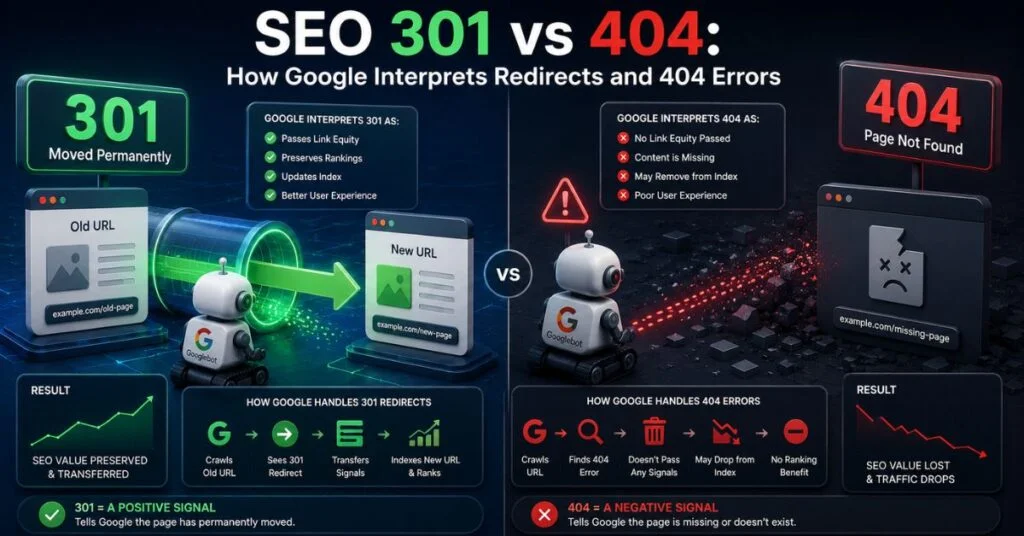
Google doesn’t just read a status code and act on it instantly — it evaluates consistency, confidence, and context before fully trusting a 301 or fully abandoning a 404’d URL. This article focuses on that interpretation layer: the edge cases, conflicting signals, and judgment calls Google’s algorithms make that go beyond the simple “301 = redirect, 404 = gone” definition most guides stop at.
Interpretation Isn’t Instant Google Builds Confidence Over Time
A single 301 response doesn’t immediately transfer full ranking authority. Google’s systems treat the first few observations of a redirect as provisional, cross-checking consistency across multiple crawl passes before fully consolidating signals. If a redirect flips back and forth — sometimes returning 301, sometimes returning 200 on the same URL — Google interprets this as unreliable and delays or withholds consolidation entirely.
Crawl 1: HTTP/1.1 301 → /new-page/
Crawl 2: HTTP/1.1 200 OK (original content still live)
Crawl 3: HTTP/1.1 301 → /new-page/
This kind of inconsistency is a common cause of “my redirect isn’t working” complaints — the redirect exists, but flip-flopping server behavior is preventing Google from trusting it.

How Google Weighs Conflicting Signals
Google doesn’t interpret a 301 or 404 in isolation — it cross-references other signals on the page and site, and conflicts change how much weight the status code receives.
Canonical Tag vs. Status Code Conflicts
If a URL returns a 301 to Page B, but Page A’s canonical tag (cached from a previous crawl) still points elsewhere, Google prioritizes the live HTTP status code as the stronger signal, but a canonical tag mismatch on the destination page can still confuse which URL Google ultimately selects as canonical in search results.
Internal Linking vs. 404 Status
If internal links across your site continue pointing to a URL that now returns a 404, Google interprets this as an unresolved internal inconsistency — the site itself hasn’t acknowledged the removal. This can slow full deindexing and wastes crawl budget revisiting a URL your own site still references.
X-Robots-Tag and Redirect Interactions
A 301 redirect combined with a noindex X-Robots-Tag on the destination page sends a contradictory message: “consolidate signals here” and “don’t index this page” simultaneously. Google generally respects the noindex directive on the destination, meaning the redirect effectively still removes the URL from search visibility despite passing some link equity internally.
Interpretation Comparison Table
| Interpretation Scenario | How Google Responds |
|---|---|
| Consistent 301 across multiple crawls | Builds confidence, consolidates signals over 2–4 weeks |
| Inconsistent 301/200 flip-flopping | Delays or withholds signal consolidation |
| 301 to a noindexed destination | Passes some equity but keeps destination out of search results |
| 404 with continued internal links pointing to it | Delays full deindexing, wastes crawl budget |
| Redirect chain (3+ hops) | May stop following before reaching final destination |
| Soft 404 (200 status, “not found” content) | Flagged as ambiguous, often excluded from index anyway |
Edge Case: Redirect Loops
A redirect loop occurs when URL A redirects to URL B, which redirects back to URL A. Googlebot detects this quickly and treats the entire loop as inaccessible — effectively the same outcome as a 404, except it’s harder for site owners to diagnose because no error page ever displays to a human visitor testing it manually in a browser with caching enabled.
apache
# Broken configuration example — creates a loop
Redirect 301 /page-a/ /page-b/
Redirect 301 /page-b/ /page-a/
Fixing this requires tracing the full redirect path with a tool like Screaming Frog’s redirect chain report, since manual browser testing often won’t reveal the loop due to local caching.

Step-by-Step: Diagnosing Interpretation Problems
- Use the URL Inspection tool in Search Console to see Google’s currently cached understanding of the URL’s status and canonical.
- Request live testing within the tool to compare Google’s cached view against the current live response.
- Check for flip-flopping status codes by testing the URL at different times, or reviewing server logs for inconsistent response patterns.
- Audit internal links with Screaming Frog to find any remaining links pointing to 404’d URLs, and update them to point to live, relevant pages.
- Check for noindex directives on redirect destinations that might be undermining an otherwise correct 301.
- Trace redirect chains fully to confirm no loops or excessive hops exist before the final destination.
Technical Takeaways
- Google requires consistency across multiple crawls before fully trusting a redirect, not just a single observation.
- Conflicting signals — canonical tags, noindex directives, internal links — can undermine an otherwise correctly configured 301 or 404.
- Redirect loops are functionally equivalent to a 404 in Google’s eyes but are harder for humans to detect manually.
- Internal links still pointing to 404’d URLs slow down full deindexing and waste crawl budget.
- The URL Inspection tool’s live test feature is the most reliable way to see current interpretation versus cached interpretation.
Where This Fits Into Your Redirect Strategy
Understanding how Google interprets these signals under real-world conditions is essential for diagnosing stubborn indexing issues. For the complete framework on redirect mapping, migration planning, and crawl budget preservation, see our comprehensive guide on 301 redirects and 404 error management.
Conclusion
Google’s interpretation of 301s and 404s goes well beyond reading a single status code — it weighs consistency, cross-references conflicting signals like canonical tags and noindex directives, and can be misled by internal linking inconsistencies or redirect loops. Diagnosing “why isn’t my redirect working” almost always comes down to one of these interpretation-layer conflicts rather than a fundamentally broken status code.
FAQ
Q: Why does my 301 redirect seem to not be working even though it’s correctly configured?
A: This often traces to inconsistent server responses across crawls, a noindex tag on the destination, or a canonical tag conflict — check the URL Inspection tool’s live test against its cached view to identify the mismatch.
Q: How does Google treat a redirect loop?
A: Googlebot detects the loop and treats the URL as effectively inaccessible, similar in outcome to a 404, though it can be harder for site owners to detect manually due to browser caching.
Q: Does a noindex tag override a 301 redirect’s ranking benefit?
A: Largely, yes — if the redirect destination has a noindex directive, Google generally keeps that page out of search results even though some link equity may still pass internally.
Q: Why do old internal links pointing to a 404’d page matter if the page is already gone?
A: They signal to Google that the site itself hasn’t fully acknowledged the removal, which can delay full deindexing and waste crawl budget on a URL that no longer needs to be revisited.

